စာကြည့်တိုက်ရှိ စတူဒီယိုများ

စာကြည့်တိုက်ရှိ စတူဒီယိုများသည် လူတစ်ဦးချင်းစီအတွက် ကျွမ်းကျင်မှုအသစ်များကို သင်ယူရန်၊ သူငယ်ချင်းများနှင့် ပူးပေါင်းဆောင်ရွက်ရန်၊ အကြောင်းအရာများကို ဖန်တီးရန်နှင့် ကျွန်ုပ်တို့၏ အသိပညာဗဟုသုတရှိသော လမ်းညွှန်များနှင့် ချိတ်ဆက်ရန်အတွက် နည်းပညာနှင့် ပစ္စည်းကိရိယာများကို အသုံးပြုခွင့်ပေးပါသည်။

စတူဒီယိုဖွင့်ချိန်များ
ကျွန်ုပ်တို့၏ လမ်းညွှန်အစီအစဉ်များနှင့်မတူဘဲ၊ ကျွန်ုပ်တို့၏ စတူဒီယိုဖွင့်ချိန်များသည် ဧည့်သည်များအား ၎င်းတို့၏ကိုယ်ပိုင်ပရောဂျက်များကို ဖန်တီးစူးစမ်းလေ့လာနိုင်စေပါသည်။ စက်များသည် ဦးရာလူစနစ်ဖြစ်သည်။ ရက်စွဲများနှင့် အချိန်များသည် ပြောင်းလဲနိုင်သည်။ ဝန်ထမ်းပံ့ပိုးမှုကို တောင်းဆိုမှုအပေါ်တွင် ရရှိနိုင်ပါသည်။
နာရီများ
တနင်္လာနေ့မှ အင်္ဂါနေ့အထိ နေ့လည် ၁ နာရီမှ ည ၉ နာရီအထိ
ဗုဒ္ဓဟူးနေ့ နေ့လည် ၁ နာရီမှ ညနေ ၆ နာရီအထိ
ကြာသပတေးနေ့ မွန်းလွဲ ၁ နာရီမှ ည ၉ နာရီအထိ
သောကြာ-စနေနေ့ မွန်းလွဲ ၁ နာရီမှ ညနေ ၆ နာရီအထိ
တနင်္ဂနွေနေ့ နေ့လည် ၁ နာရီမှ ညနေ ၅ နာရီအထိ
ဖုန်း
(၂၆၀) ၄၂၁-၁၂၄၅
စက်များ
ဆော့ဖ်ဝဲ
Prusa MK4S 3D ပရင်တာများ (3)
ခလုတ်ပြုလုပ်စက် (၂.၂၅")
Cricut အော်တိုပရက်စ်
Cricut တောက်ပသော Pad
Cricut Maker 4
အိုင်းစကန် 3D စကင်နာ
Glowforge HD Pro လေဆာပရင်တာ
Gweike LG6040N လေဆာပရင်တာ
သံ/သံခုံ
ပလတ်မီနတာ
ဓာတ်ပုံနှင့် ဆလိုက်စကင်နာ
Prusa XL 3D ပရင်တာများ (၂)
Janome Sewist 525s အပ်ချုပ်စက်
Silhouette Cameo Pro MKII
VHS မှ DVD သို့ပြောင်းလဲခြင်း
ဘူတာရုံစားပွဲတင်စင်ပါသော Wacom Cintiq Pro
Adobe Creative Cloud
(After Effects၊ Audition၊ Illustrator၊ Indesign၊ PDF Reader၊ Photoshop၊ Premiere၊ Rush)အာဒူရီနို IDE
ရဲရင့်မှု
ဘလင်းဒါ
Cricut ဒီဇိုင်းနေရာ
ဒါဗင်ချီ ရီဆိုလ်ဗ်
ဖယ်လ် စတူဒီယို*
လက်ဘရိတ်
အလင်းလောင်ကျွမ်းခြင်း
ပါဝါ BI
ပရူဆာ စလစ်တာ
Silhouette Studio
ခိုင်မာသောအနား**
*FL Studio Producer ကို Sound နှင့် Podcasting Booth Desktop များတွင် ရရှိနိုင်ပါသည်။ FL Studio Fruity ကို PC Laptop များတွင် ရရှိနိုင်ပါသည်။
** 3D Scanner Station Laptop တွင် ရရှိနိုင်ပါသည်
အသက်အရွယ်မရွေး STEAM ပစ္စည်းများ (စာကြည့်တိုက်ကတ် လိုအပ်ပါသည်)
Ozobot Evo Line Coding Kit (မူကြိုနှင့်အထက်)
၂၀၂၅/၂၀၂၆ ဆောင်းရာသီမှာ နောက်ထပ် ဝတ်စုံတွေ လာပါတော့မယ်။
အိမ်တွင်း လည်ပတ်နေသော လက်ပ်တော့များနှင့် နည်းပညာဆက်စပ်ပစ္စည်းများ (စာကြည့်တိုက်ကတ် လိုအပ်သည်)
PC လက်တော့ပ်များ (၁၀)
လက်တော့ပ်ဆက်စပ်ပစ္စည်းအစုံ- အားသွင်းကိရိယာ၊ မောက်စ်၊ မောက်စ်ပက် (၁၀)
၇-in-၁ USB ဒေါ့ကက်စတီယာ
Arturia MiDi ထိန်းချုပ်ကိရိယာ (၄) ခု
DVD ရေးသားသူ
ဖလော့ပီဒစ်ဖတ်စက်
နားကြပ် (၅) ခု
Huin Inspiroy Drawing Tablet (၆) လုံး၊
မန်မိုရီကတ်ဖတ်စက်
SD ကတ်ဖတ်စက်
USB-A မှ USB-C သို့ အဒက်တာ (2)
USB-C မှ USB သို့ အဒက်တာ
USB သယ်ဆောင်ရလွယ်ကူသော ဒစ်ကက်ဒရိုက်
နာရီများ
တနင်္လာနေ့ နံနက် ၁၀ နာရီမှ နေ့လည် ၁ နာရီအထိ
အင်္ဂါနေ့ ညနေ ၅ နာရီမှ ၈ နာရီအထိ
ဗုဒ္ဓဟူးနေ့ နံနက် ၁၀ နာရီမှ မွန်းလွဲ ၁ နာရီအထိ
ကြာသပတေးနေ့ မွန်းလွဲ ၂ နာရီမှ ညနေ ၅ နာရီအထိ
စနေနေ့ နေ့လည် ၂ နာရီမှ ညနေ ၅ နာရီအထိ
စက်အသုံးပြုမှုချိန်းဆိုမှုများ-
စာကြည့်တိုက်ဖွင့်ချိန်အတွင်း အချိန်မရွေး၊ စတူဒီယိုဖွင့်ချိန်များနှင့် စတူဒီယိုအစီအစဉ်များမှအပ။
ချိန်းဆိုချိန်များသည် ဝန်ထမ်းရရှိနိုင်မှုပေါ် မူတည်၍ ကွဲပြားပါသည်။ ချိန်းဆိုမှုများကို ၃ ရက်မှ ၇ ရက်ကြိုတင်စီစဉ်ရပါမည်။
သင့်ချိန်းဆိုမှုကို ကြိုတင်စာရင်းသွင်းရန် ဖုန်းခေါ်ဆိုပါ။
ဖုန်း
(၂၆၀) ၄၂၁-၁၃၂၀ x၄၄၀၇
စက်များ
Software
ခလုတ်ပြုလုပ်သူ
Cricut အော်တိုပရက်စ်
Cricut တောက်ပသော Pad
Cricut Maker 3
Glowforge HD Plus လေဆာပရင်တာ
သံ/သံပြားများ
Janome 525S အပ်ချုပ်စက်
ပလတ်မီနတာ
ပရူဆာ Mk4S (၂)
Silhouette Cameo 4 Plus
Adobe Creative Cloud*
(After Effects၊ Audition၊ Illustrator၊ Indesign၊ PDF Reader၊ Photoshop၊ Premiere၊ Rush)ဘလင်းဒါ
Cricut ဒီဇိုင်းနေရာ
လက်ဘရိတ်
ပါဝါ BI
Silhouette Studio
စတော့မိုရှင်း စတူဒီယို
* Laptop တစ်လုံး (၁) လုံးတွင် တပ်ဆင်ထားသည်
အိမ်တွင်း ဖြန့်ဝေသည့်ပစ္စည်းများ (စာကြည့်တိုက်ကတ် လိုအပ်သည်)
PC လက်တော့ပ်များ (၁၀)
လက်တော့ပ်ဆက်စပ်ပစ္စည်းအစုံ- အားသွင်းကိရိယာ၊ မောက်စ်၊ မောက်စ်ပက် (၁၀)
HUION ပုံဆွဲပြားများ (၂)
၇-in-၁ USB ဒေါ့ကက်စတီယာ
မန်မိုရီကတ်ဖတ်စက်
USB-A မှ USB-C သို့ အဒက်တာ
USB-C မှ USB သို့ အဒက်တာ
USB သယ်ဆောင်ရလွယ်ကူသော ဒစ်ကက်ဒရိုက်
DVD ရေးသားသူ
နာရီများ
ဗုဒ္ဓဟူးနေ့များ ညနေ ၃ နာရီမှ ၅ နာရီအထိ
ပထမအပတ် စနေနေ့ နံနက် ၁၁ နာရီမှ နေ့လည် ၁ နာရီအထိ
ဖုန်း
မေးခွန်းများအတွက် ဘဏ်ခွဲသို့ ၂၆၀-၄၂၁-၁၃၃၀ သို့ ဖုန်းခေါ်ဆိုပါ။
စက်များ
ဆော့ဖ်ဝဲ
ပရူဆာ Mk4S
ခလုတ်ပြုလုပ်သူ
Cricut အော်တိုပရက်စ်
Cricut တောက်ပသော Pad
Cricut Maker 3
ပလတ်မီနတာ
Janome Sewist 500 အပ်ချုပ်စက်
အာဒူရီနို IDE
ဘလင်းဒါ
Cricut ဒီဇိုင်းနေရာ
ပရူဆာ စလစ်တာ
အိမ်တွင်း ဖြန့်ဝေသည့်ပစ္စည်းများ (စာကြည့်တိုက်ကတ် လိုအပ်သည်)
PC Laptop များနှင့် Laptop ဆက်စပ်ပစ္စည်းများ (6)
HUION ပုံဆွဲပြားများ (၁)
နာရီများ
အင်္ဂါနေ့ ညနေ ၄ နာရီမှ ၆ နာရီအထိ
၂ ရက်မြောက် စနေနေ့ ညနေ ၃ နာရီမှ ၅ နာရီအထိ
ဖုန်း
မေးခွန်းများအတွက် ဘဏ်ခွဲသို့ ၂၆၀-၄၂၁-၁၃၅၀ သို့ ဖုန်းခေါ်ဆိုပါ။
စက်များ
ဆော့ဖ်ဝဲ
ပရူဆာ Mk4S
ခလုတ်ပြုလုပ်သူ
Cricut အော်တိုပရက်စ်
Cricut တောက်ပသော Pad
Cricut Maker 3
ပလတ်မီနတာ
Janome Sewist 525S အပ်ချုပ်စက်
အာဒူရီနို IDE
ဘလင်းဒါ
Cricut ဒီဇိုင်းနေရာ
ပရူဆာ စလစ်တာ
အိမ်တွင်း ဖြန့်ဝေသည့်ပစ္စည်းများ (စာကြည့်တိုက်ကတ် လိုအပ်သည်)
PC Laptop များနှင့် Laptop ဆက်စပ်ပစ္စည်းများ (9)
HUION ပုံဆွဲပြားများ (၂)
နာရီများ
ပထမနှင့် တတိယ တနင်္လာနေ့များတွင် ညနေ ၄ နာရီမှ ၆ နာရီအထိ
ဒုတိယအပတ် စနေနေ့ နံနက် ၁၀ နာရီမှ နေ့လည် ၁၂ နာရီအထိ
စတုတ္ထအပတ် ဗုဒ္ဓဟူးနေ့တိုင်း ညနေ ၆ နာရီမှ ၈ နာရီအထိ
ဖုန်း
မေးခွန်းများအတွက် ဘဏ်ခွဲသို့ ၂၆၀-၄၂၁-၁၃၅၅ သို့ ဖုန်းခေါ်ဆိုပါ။
စက်များ
ဆော့ဖ်ဝဲ
3D ပရင်တာ
ခလုတ်ပြုလုပ်သူ
Cricut အော်တိုပရက်စ်
Cricut တောက်ပသော Pad
Cricut Maker
ပလတ်မီနတာ
အပ်ချုပ်စက်
အာဒူရီနို IDE
ဘလင်းဒါ
Cricut ဒီဇိုင်းနေရာ
ပရူဆာ စလစ်တာ
အိမ်တွင်း ဖြန့်ဝေသည့်ပစ္စည်းများ (စာကြည့်တိုက်ကတ် လိုအပ်သည်)
PC Laptop များနှင့် Laptop ဆက်စပ်ပစ္စည်းများ (6)
HUION ပုံဆွဲပြားများ (၁)
The Studio ကို ဖွင့်ချိန်များအတွက် အသုံးပြုလိုသော အရွယ်မရောက်သေးသူအားလုံး (၁၇ နှစ်နှင့်အောက်) သည် မိဘ/အုပ်ထိန်းသူ လက်မှတ်ရေးထိုးထားသော ပါဝင်မှုဆိုင်ရာ ထုတ်ပြန်ချက် ပါရှိရမည်။ ဆဋ္ဌမတန်း သို့မဟုတ် ထို့ထက်ငယ်သော ကလေးများကို မိဘ/အုပ်ထိန်းသူမှ တိုက်ရိုက်ကြီးကြပ်ရမည်။
ပါဝင်သူများသည် ၎င်းတို့၏ကိုယ်ပိုင် ပရောဂျက်ပစ္စည်းများကို ယူဆောင်လာနိုင်သည် သို့မဟုတ် စာကြည့်တိုက်မှ ဝယ်ယူနိုင်သည်။
Studio Programs

Studio မှာ ပရောဂျက်အသစ်တစ်ခုကို စတင်လုပ်ဆောင်နိုင်ဖို့ ဒါမှမဟုတ် သင့်ရဲ့ကျွမ်းကျင်မှုတွေကို နောက်တစ်ဆင့်တက်လှမ်းနိုင်ဖို့အတွက် လူကိုယ်တိုင်တက်ရောက်နိုင်တဲ့ အစီအစဉ်အမျိုးမျိုးကို ပေးဆောင်ပါတယ်။ မိတ်ဆက်အစီအစဉ်တွေက အခြေခံစက်နဲ့ ဆော့ဖ်ဝဲလ်လည်ပတ်မှုကို အာရုံစိုက်ပြီး အလယ်အလတ်အစီအစဉ်တွေကတော့ အရင်ဗဟုသုတတွေကို အခြေခံပြီး တည်ဆောက်ထားတဲ့အတွက် နည်းစနစ်အသစ်တွေ၊ ကျွမ်းကျင်မှုတွေ ဒါမှမဟုတ် ပရောဂျက်အမျိုးအစားတွေကို စူးစမ်းလေ့လာနိုင်ပါတယ်။ အစီအစဉ်အများစုဟာ အသက်အရွယ်မရွေး တက်ရောက်နိုင်ပါတယ်။

Studio မှာ ပရောဂျက်အသစ်တစ်ခုကို စတင်လုပ်ဆောင်နိုင်ဖို့ ဒါမှမဟုတ် သင့်ရဲ့ကျွမ်းကျင်မှုတွေကို နောက်တစ်ဆင့်တက်လှမ်းနိုင်ဖို့အတွက် လူကိုယ်တိုင်တက်ရောက်နိုင်တဲ့ အစီအစဉ်အမျိုးမျိုးကို ပေးဆောင်ပါတယ်။ မိတ်ဆက်အစီအစဉ်တွေက အခြေခံစက်နဲ့ ဆော့ဖ်ဝဲလ်လည်ပတ်မှုကို အာရုံစိုက်ပြီး အလယ်အလတ်အစီအစဉ်တွေကတော့ အရင်ဗဟုသုတတွေကို အခြေခံပြီး တည်ဆောက်ထားတဲ့အတွက် နည်းစနစ်အသစ်တွေ၊ ကျွမ်းကျင်မှုတွေ ဒါမှမဟုတ် ပရောဂျက်အမျိုးအစားတွေကို စူးစမ်းလေ့လာနိုင်ပါတယ်။ အစီအစဉ်အများစုဟာ အသက်အရွယ်မရွေး တက်ရောက်နိုင်ပါတယ်။
STEM Kits
Self-directed activities to use in The Studio at Main during Open Studio Hours.
In February, The Studio at Main celebrated their first anniversary of being in their new space. With that celebration came new ways to learn and enjoy The Studio. Six STEM Kits are now available for patrons to enjoy. The kits are self-directed activities that patrons can use within The Studio. Currently, most of the kits are on the floor and available for anyone to use. By fall, kits will be available only for checkout with an ACPL library card. More kits to be revealed soon.

3D Pen
A 3D pen is a handheld filament nozzle that allows the user to draw and build in 3D similar to how a 3D printer works.
.jpg)
Ozobot - Line Coding
The Ozobot is a tiny robot that follows lines. These lines contain different colors that the Ozobot can read and tell it what to do. These lines can be drawn with markers or made with magnetic tiles.
.jpg)
Lego Braille
Lego Braille uses Lego bricks with varied stud arrangements on top to be letters in Braille. Mix and match blocks to make your own messages.
.jpg)
3D Puzzles
There are three levels of difficulty for the 3D printed three-dimensional puzzles. All the puzzles were printed in house at The Studio at Main.
.jpg)
Magnet Cubes
Magnet Cubes are tiny blocks that can be stuck together to build all kinds of creations. The kit also includes bearing blocks to allow creations to move and spin.

Tangrams
Tangrams challenge the brain to use many different shapes to make up one image.
New Digital Conversion Technology
The Studio at Main has new digital conversion technology for patron use during Studio Open Hours. These upgrades allow patrons to quickly digitize multiple photos and 8mm /film reels. These machines join our VHS to DVD conversion station, Epson flatbed scanner, and 3D scanner.

Epson FastFoto FF-680W Photo Scanner
The Epson FastFoto can scan as small as 4 inches x 6 inches up to US letter sized photos and documents. It can scan one photo at 300 dpi per second and scan at a maximum resolution of 1200 dpi. Document size and resolution will affect scanning speeds. This machine is intended to be used with Studio laptops and software. The Studio at Main sells blank USB sticks, or patrons can bring their own.

Wolverine Movie Maker
The Movie Maker takes 8mm and Super 8 film and converts it to a digital format. It does this by scanning every frame of the reel and putting them together. This process can be time consuming. The scanned film is saved to a patrons personal SD card. The Studio at Main sells blank SD cards, or patrons can bring their own.

Epson Perfection V370 Photo Scanner
The Epson Photo Scanner is a piece of digital conversion technology that is not new to The Studio. This flatbed scanner can scan photos, documents, 35mm slides, and camera film. The Studio at Main now has detailed instructions for scanning 35mm slides. The Studio at Main sells blank USB sticks, or patrons can bring their own.

Toshiba DR430KU VHS to DVD Converter
The Toshiba is also not new to The Studio but fits in with our new technology. The Toshiba takes VHS or VHS-C and converts them to DVD. This is done by playing the VHS and recording it. This process takes as long as the length of the VHS tape. If the VHS is longer than the space on the DVD, it can be recorded on multiple DVDs. The Studio at Main sells blank 120 min DVDs, as well as paper and plastic disk sleeves, or patrons can bring their own.
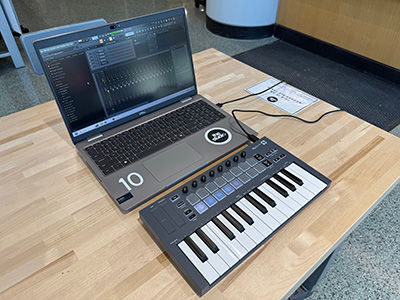
FLkey MIDI ထိန်းချုပ်ကိရိယာ

Wacom ပုံဆွဲတက်ဘ်
The Studio မှာ လည်ပတ်နေတဲ့ ပစ္စည်းအသစ်တွေ – Wacom Drawing Tablets နဲ့ FLkey MIDI Controller
The Studio မှာ ဒစ်ဂျစ်တယ်နည်းပညာနဲ့ ဖန်တီးနိုင်မယ့် နည်းလမ်းအသစ်တွေ ရောက်ရှိလာပါပြီ။ အခုဆိုရင် Wacom Intuos S ပုံဆွဲတက်ဘလက် ၁၀ လုံးရှိပြီး The Studio မှာ ငွေရှင်းပြီး အသုံးပြုနိုင်ပါတယ်။ Wacom ပုံဆွဲတက်ဘလက်တွေကို The Studio လက်တော့ပ်တွေနဲ့ ဒစ်ဂျစ်တယ်အနုပညာဖန်တီးနိုင်ပါတယ်။ Wacom Kit အားလုံးမှာ အမြန်စတင်အသုံးပြုနည်း ညွှန်ကြားချက်တွေ ပါရှိပါတယ်။ ဒီစာကြည့်တိုက်က Adobe Creative Cloud အပလီကေးရှင်းအများစုကို အသုံးပြုခွင့်ပေးတာကြောင့် ဒီတက်ဘလက်အသစ်တွေကို Adobe Animate၊ Fresco၊ Photoshop နဲ့ Illustrator တို့နဲ့ အပြည့်အဝအသုံးပြုနိုင်ပါတယ်။
FLkey Mini Musical Instruments Digital Input (MIDI) controllers တွေကိုလည်း ပွဲဦးထွက်အနေနဲ့ မိတ်ဆက်ပေးထားပြီး ဂီတဖန်တီးမှုအတွက် FL Studio နဲ့အတူ အသုံးပြုနိုင်ပါတယ်။ FLkey Mini မှာ mini-key ၂၅ ခု၊ velocity-sensitive pad ၁၆ ခု၊ customizable pot ၈ ခုနဲ့ essential transport controls တွေ ပါဝင်ပါတယ်။ MIDI Controller Kit အားလုံးမှာ quick start use instructions အပြည့်အစုံ ပါဝင်ပါတယ်။ Allen County Public Library က The Studio ရဲ့ laptop အားလုံးမှာ FL Studios Fruity ကို အသုံးပြုခွင့်နဲ့ Recording Booth computer မှာ FL Studios Pro ကို အသုံးပြုခွင့် ပေးထားပါတယ်။ Studio က ACPL ရဲ့ Access Fort Wayne မှ Kay Gregg နဲ့အတူ Fl Studio Fruity နဲ့ FLkey MIDI Controller ကို ဘယ်လိုအသုံးပြုရမလဲဆိုတာ လေ့လာနိုင်မယ့် program တစ်ခုကို နွေဦးရာသီမှာ ပေးဆောင်နေပါတယ်။
ဘာလဲဆိုတော့ FL Studio နဲ့ Beats အကြောင်း မိတ်ဆက်ခြင်း – Digital Beat ပရိုဂရမ်ရေးသားခြင်းရဲ့ အခြေခံတွေပါ။
နေရာ: Main ရှိ စတူဒီယို
အချိန်: မေလ ၂၀ ရက်၊ ဗုဒ္ဓဟူးနေ့၊ ညနေ ၆:၃၀ မှ ၈:၃၀ အထိ
မှတ်ပုံတင်ပါ- အစီအစဉ်များသည် အခမဲ့ဖြစ်ပြီး ကြိုတင်မှတ်ပုံတင်ရန် အထူးတိုက်တွန်းပါသည်၊ သင့်နေရာကို ကြိုတင်စာရင်းသွင်းရန်။

3D ပုံနှိပ်ထားသော ဒိုင်နိုဆော သော့ချိတ်များ
အစီအစဉ် အထူးအစီအစဉ် – 3D ပုံနှိပ်ခြင်းမိတ်ဆက် – ဒိုင်နိုဆော သော့ချိတ်များ
3D ပုံနှိပ်ခြင်း၏ အခြေခံများကို လေ့လာပြီး TinkerCAD နှင့် Studio ၏ Prusa Printers များကို အသုံးပြု၍ ဒစ်ဂျစ်တယ်ဒီဇိုင်းမှ ပုံနှိပ်ပြီးသော ပရောဂျက်အထိ လုပ်ငန်းစဉ်တစ်လျှောက် သင့်ကိုယ်ပိုင် ဒိုင်နိုဆောပုံစံ သော့ချိတ်ကို ပြုလုပ်ပါ။ Shawnee Branch မှ အကြီးတန်းစာကြည့်တိုက်မှူးနှင့် ပရိုဂရမ်၏ ဖန်တီးရှင် Gabriel Downs က “Intro to 3D Print တစ်ခုချင်းစီသည် အင်္ဂါရပ် သို့မဟုတ် ကျွမ်းကျင်မှုတစ်ခုကို အာရုံစိုက်ပါက၊ ဤတစ်ခုသည် အွန်လိုင်း 3D မော်ဒယ်များကို အကဲဖြတ်ခြင်းနှင့် ၎င်းတို့ကို ဒေါင်းလုဒ်လုပ်ခြင်းနှင့် Tinkercad ထဲသို့ ထည့်သွင်းခြင်းလုပ်ငန်းစဉ် (thumb drive တွင် ဖိုင်များကို ကြိုတင်ထည့်သွင်းခြင်းအစား) ကို အာရုံစိုက်စေလိုပါသည်။ ရည်ရွယ်ချက်မှာ Studio ကို သီးခြားအသုံးပြုပါက ဖောက်သည်တစ်ဦး ရရှိနိုင်သည့် အပြန်အလှန်ဆက်သွယ်မှုမျိုးကို အတုယူရန်ဖြစ်သည်” ဟု ပြောကြားခဲ့သည်။
ဒီပရိုဂရမ်က အခမဲ့ ဝဘ်အခြေပြု ကွန်ပျူတာအကူအညီနဲ့ ဒီဇိုင်းရေးဆွဲတဲ့ ပရိုဂရမ်တစ်ခုဖြစ်တဲ့ TinkerCAD မှာ 3D မော်ဒယ်တစ်ခုကို ဒစ်ဂျစ်တယ်နည်းပညာနဲ့ ဒီဇိုင်းဆွဲနည်းကို ပြသပေးပါတယ်။ ပြီးရင် TinkerCAD ကနေ မော်ဒယ်ကို ဘယ်လိုထုတ်ယူပြီး Prusa 3D ပရင်တာတွေအတွက် 3D မော်ဒယ်တွေကို ပြင်ဆင်ပေးတဲ့ slicer ဆော့ဖ်ဝဲတစ်ခုဖြစ်တဲ့ Prusa Slicer ထဲကို ဘယ်လိုတင်သွင်းရမလဲဆိုတာ လေ့လာပါ။ နောက်ဆုံးမှာတော့ ပရောဂျက်အပြည့်အစုံကို တက်ရောက်သူတွေ သိမ်းဆည်းထားနိုင်အောင် ပရင့်ထုတ်ပေးသွားမှာ ဖြစ်ပါတယ်။
ဘာလဲဆိုတော့ 3D ပုံနှိပ်ခြင်းအကြောင်း မိတ်ဆက် - ဒိုင်နိုဆော သော့ချိတ်
နေရာ: စာကြည့်တိုက်ရှိ စတူဒီယိုများ
ဘယ်တော့လဲ:
မှတ်ပုံတင်ပါ- အစီအစဉ်များသည် အခမဲ့ဖြစ်ပြီး သင့်နေရာကို ကြိုတင်စာရင်းသွင်းရန်အတွက် ကြိုတင်မှတ်ပုံတင်ရန် အထူးတိုက်တွန်းပါသည်။